Project description
Client, a company providing home repair services for individual and corporate customers across London (UK), has implemented the Salesforce Field Service solution. To improve the efficiency of the online order and billing processes for customers, desktop and mobile access for Technicians to featured information it was decided to use Communities.
Goals
- Give customer efficient tool for online orders creation;
- Make the transition to a new community invisible to the client;
- Save look and feel of Client’s website;
- Get rid of old mobile application;
- Give Technicians access to basic reports and dashboards
Tasks
- During developing the front-end part of the customer community, fully reproduce the version of the client's booking system before the community;
- Implement custom domain;
- Make Communities mobile optimized;
- Brand Technicians’ community, create reports and dashboards
JET BI services performed
- Created, configured, and Designed Customer Community;
- Created and configured Technician Community;
- Implemented a mobile-optimized version of Customer Community;
- Implemented logic for image compression during Work Order creation;
- Created logic for video adding during Work Order creation;
- Developed custom calendar;
- Integrated with address population service to assist the customer to fill in the address;
- Redesigned Customer Community in line with current trends;
- Implemented logic to block the possibility of creating Work Orders by debtors;
- Developed 46 Customer Community web automation tests to test the Customer Community scenario of order booking;
- Configured scheduler for a daily test run;
- Created reports to be sent to the customer and team members at the end of the test run;
- Ongoing maintenance and support services.
The core business scenario on the Customer
Community:
- Customer logins/registers to the Community;
- The customer chooses Work Types, describes jobs that need to be done, adding photos/videos of the issue;
- Adds Work-site Address, rough estimate the visit will need, selects Technician, suitable date from the calendar, available start time, adds Payment Card;
- Completes Booking;
- Reviews Order Details
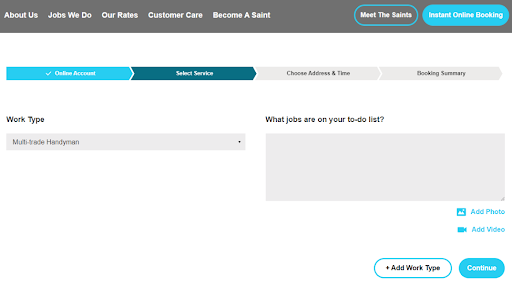
Picture 1: Select Service Page of Customer Community
.png)
Picture 2.1: Choose Address and Time Page of Customer Community - Address selection
.png)
Picture 2.2: Choose Address and Time Page of Customer Community - Calendar
.png)
Picture 3: Booking Summary Page of Customer Community
.png)
Picture 4: Home Page of Technician Community
Results:
- More than 50% of orders are made using Customer Community;
- Reduced number of bookings via email/phone;
- Continuous Community quality reports are available for the customer and team daily without manual testing iterations;
- Technicians have portal where up-to-date statistical information can be found