
Project description
The client will implement the ‘‘Jet BI Resource Allocation Wizard’- Salesforce® tool to provide a streamlined workflow and resource scheduling for better resource utilization and quality project management and employee workload control by week and month.
Goals and tasks
- Consolidating information into a unified database to enable reporting and historical analysis.
- Implementation of automated user filtering and enforcing data visibility for team leads.
- Enhancing efficiency by automating the process of JIRA project selection.
- Track availability for new employees.
- Optimizing resource utilization to increase overall productivity.
- Ensure transparency in resource planning by making it accessible to all team members.
- Forecast resource utilization to anticipate future requirements accurately.
- Creation of a plan-fact report to compare planned resource allocations with actual usage.
Project scope
The team performed consulting and development services including:
- Migration of employee data, including all characteristics and skills.
- Data Migration of client projects, ensuring the transfer of all related data such as title, status, Jira ID, and other related information.
- Configuration of a project manager's view to access actual workload data.
- Configuration of workload data views for each employee based on role and mentorship.
- Implementation of a ‘Plan report’ feature that displays workload information.
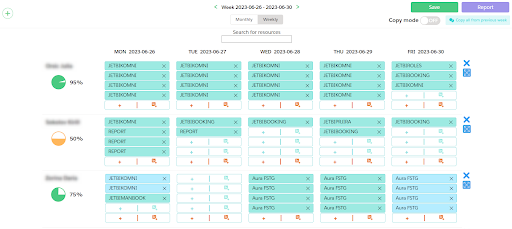
Picture 1: Displaying ‘‘Jet BI Resource Allocation Wizard’ for the project manager. Weekly mode
Note:

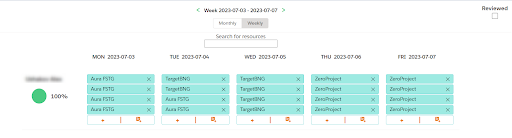
Picture 2: Displaying workload for an employee.

Picture 3: Displaying the filter panel.
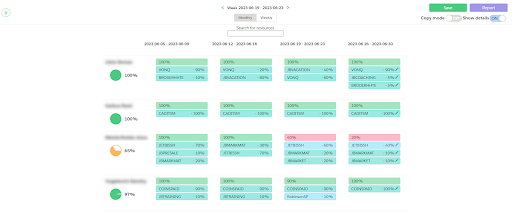
Picture 4: Displaying ‘‘Jet BI Resource Allocation Wizard’ for the project manager. Monthly mode
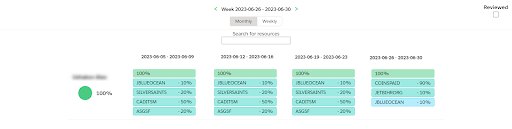
Picture 5: Displaying workload for an employee. Monthly mode
Result
- Displaying employee workload in monthly and weekly format for the project manager.
- Ability to add workload to employees by specifying a project and workload percentage.
- Change and delete workloads for employees.
- Double-click to confirm workload.
- Filter by multiple filters:
- By project role,
- By team leader,
- By department.
- Search for employees using the ‘Resource search’.
- Autosave modified workload.
- Displaying karma points for project managers.
- Checkbox on the employee upload page to confirm upload review.
Advantages of JET BI
- 20+ Products successfully designed, developed and published on AppExchange for top AppExchange ISV vendors during the last 5 years. JET BI’s own products (Advantage for Salesforce, Conversayit for Salesforce) are already listed on AppExchange;
- All-In-One Product Development Service provider. 50+ highly-skilled engineers, UX designers, developers, QA, and security experts will get you covered throughout the process of getting your app to shine on the AppExchange. Hybrid solutions with Heroku. iOS and Android mobile app's development;
- Certified Salesforce Developers (DEV II), SCRUM Masters, Front-end developers, ISTQB-certified QA. All Salesforce-recommended best-practices for development on Salesforce platform at your hand;
- Highest quality and security. JET BI’s core values include trust, security, and quality. We implement the highest security standards on all levels. Efficient ISO-certified software quality management;
- AppExchange® for business. We can help you with Salesforce Sales Cloud for ISV (“business org”) setup, integration with 3rd party systems, publishing console training, LMA, and trial force setup. We will help your sales team to increase customer engagement, revenue, transparency, and conversion with #1 Sales automation tool in the world;
- Industry-specific and 3rd party system's integration. Sales Cloud, Service Cloud, Community Cloud, Financial Services Cloud, Field Service. Deep expertise in integration with SAP ERP and SAP HANA. IoT and VR solutions. Professional Services, Real-estate, Retail, Fashion, Banking, Oil&Gas.









