Project description
Client, a company providing home repair services for individual and corporate customers across London (UK), implemented Salesforce Field Service Lightning to improve the efficiency of the delivered services: automate order and billing processes, optimize real-time onsite operations, and replace a bundle of outstanding software with Salesforce.
Goals
- Optimize current business processes of the customer and improve their efficiency;
- Customize Salesforce CRM to meet the unique customer needs;
- Establish efficient change-management processes to address faster new business requirements without affecting ongoing business operations.
Tasks
- Replace in-house CRM and 10 separate systems (Case and email management, Email, Instant messaging, Desktop to mobile SMS, Credit card processing systems, Mobile app, etc.) with Salesforce cloud products;
- Perform basic configuration of Salesforce Service Cloud, Field Service Lightning, LiveMessage, Customer Community, Contractor’s Community, Reports, and Dashboards;
- Execute data migration;
- Setup integration with several 3rd party services;
- Automate recruiting process;
- Set up automation testing.
JET BI services performed
Team accomplished consulting and custom development services including:
- Requirements analysis and blueprint preparation;
- Salesforce CRM (Enterprise Edition) setup for 50+ Salesforce users;
- Data migration from the current CRM, and email management systems;
- Integration with VOIP Bria, QuickBooks online (using Zapier), Stripe, Constant Contact (using Zapier), Sovren, Adobe Sign;
- Custom development (APEX (Batches, Triggers, Queueable, Future), Visualforce (Pages, Components), Lightning (LWC, Aura);
- Declarative development (Workflow, Processes, Flows, Email Templates ( Visualforce, custom, HTML);
- Out-of-the-box configuration (Connected App, Outbound Messages);
- Messaging (Facebook, WhatsApp, SMS), messaging templates configuration;
- Reports and Dashboards creation;
- Training sessions on Work Order Flow for client`s employees;
- Salesforce Surveys setup;
- Automation testing setup for Salesforce UI, Customer Community, and the Salesforce Field Service mobile app;
- Customer Community, Partner Community design development and implementation;
- Strong Customer Authentication (SCA) on European payments implementation (2 Factor authentication for Payments);
- CI/CD implementation;
- Ongoing maintenance and support services.
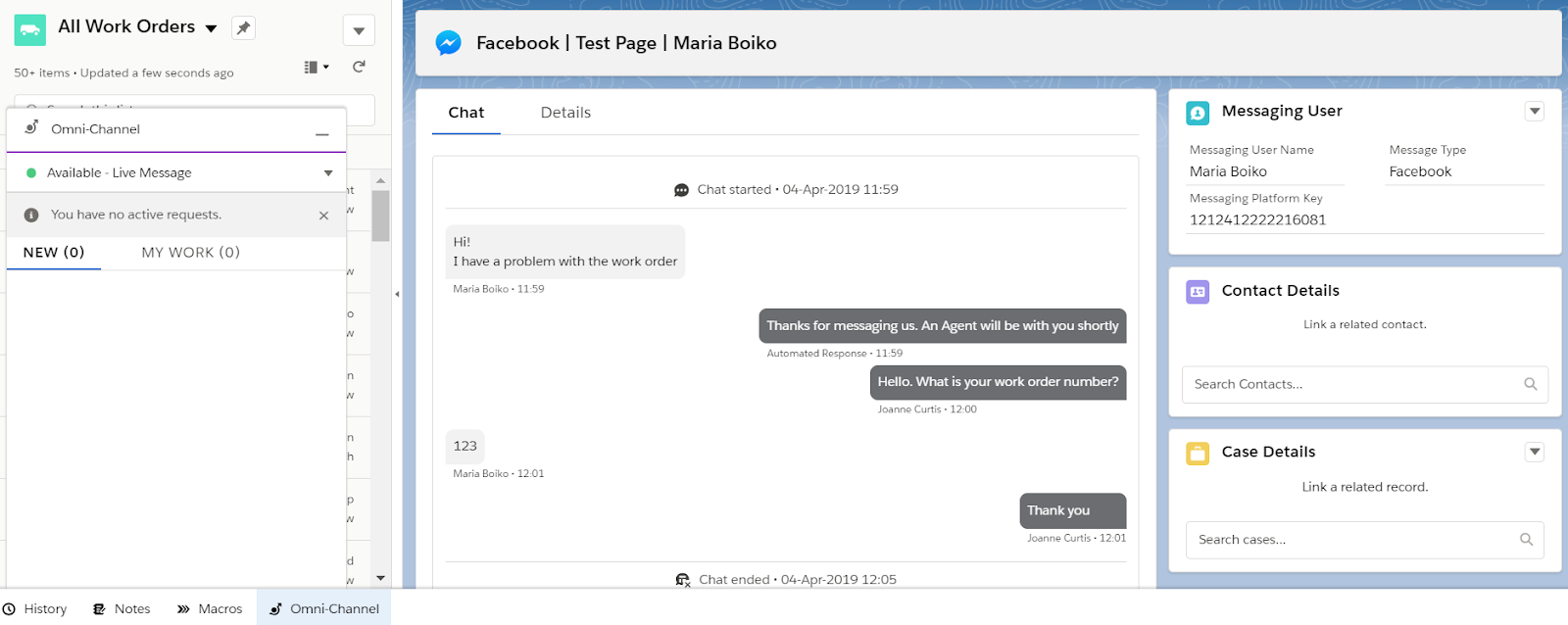
Picture 1: Configured LiveMessage feature allows to send and receive Facebook messages from Salesforce
.png)
Picture 2: During the talk with the client Agents have the ability to schedule and dispatch Service Appointment right from the Work Order Chatter
.png)
Picture 3: Configured Work Order Status Path visualizes the whole process of Work Order lifecycle and ease Agents work
.png)
Picture 4: Standard Gannt chart allows Dispatcher to see the whole picture of team’s workload
Result
- Salesforce CRM system implemented and integrated into existing infrastructure;
- The implemented solution made it possible to scale the company's business processes in the face of the rapid growth of the client base;
- Major company business processes are covered by Salesforce products;
- Work Order types configured according to existing business processes for different client inquiry types;
- Configured Dispatcher, Administrator, and Technicians FSL Roles and roles hierarchy;
- Security and OWD settings set up;
- Field Service Lightning Objects: Work Order, Work Order Line Item, Service Appointment, Product Objects customized;
- Layouts are adjusted and assigned;
- Work Order Path implemented: now the team can quickly see, and update statuses by clicking the desired value on the Path;
- Mobile Field Service Package for IOS and Android installed and configured;
- Service Territories are created, and operating hours for each Service territory are configured;
- Service Report Template for Invoicing and Billing needs to be configured;
- Case Assignment Rules implemented;
- Omni-channel configured;
- The implemented solution is ready for further scaling, product line/sales volumes growth;
- Master data migrated into the CRM;
- Integrations with 3rd party apps performed;
- Payments security increased with the latest security protocol 3DS2;
- Сonstant checking of functionality in connection with Salesforce releases, tracking changes in functionality;
- Time spent by Support Agents for each action was reduced;
- Overall staff efficiency increased;
- Basic training performed for Admin (Managing Director).
Client's review:
“JET BI directed the transition with little disruption to the business's daily workflow. Their team managed the project well by tracking the progress of each task closely. They were dedicated, efficient, and productive partners. The partnership was successful and they continue to work together”.
.png)