Client
JET BI's client is a company that has proven experience in designing and delivering purpose-built apps on the Salesforce platform. Most of the apps were developed by our JET BI team. Our successful cooperation has been going on for many years and makes it possible to implement all new ideas.
Challenges
One of the products that JET BI team is working on combines two products that can work either together or separately. The first is a help center with an intelligent search that uses a knowledge base and includes efficient support services. And the second product is ITSM solution with out-of-the-box ITIL processes designed to drive Continual Service Improvement (CSI) for any service delivery function, from internal help desks that support the IT needs of employees, to customer-facing operations that serve clients.
Our task was to build an effective development and testing process and synchronize releases to make sure all new features in both packages work fine together.
Goals
1. Establish effective communication with the product owner on the client side for:
- correct prioritization;
- understanding the main goals of releases;
- clarification of requirements;
2. Ensure transparency and manageability of the development and testing process for the client;
3. Define and agree with the workflow with the team according to the configured CI/CD process;
4. Define the procedures for UAT testing;
5. Find an instrument for effective test management;
6. Ensure the release of new features is on schedule.
Solutions
To organize effective communication with the client and identify all the pitfalls in the early stages, the JET BI team introduced an Agile approach. This approach also made it possible to painlessly respond to changes in requirements and implement them in a short time. The close interaction of the development and testing teams, as well as the addition of acceptance criteria to the requirements, made it possible to deliver the functionality on time and with maximum compliance with expectations.
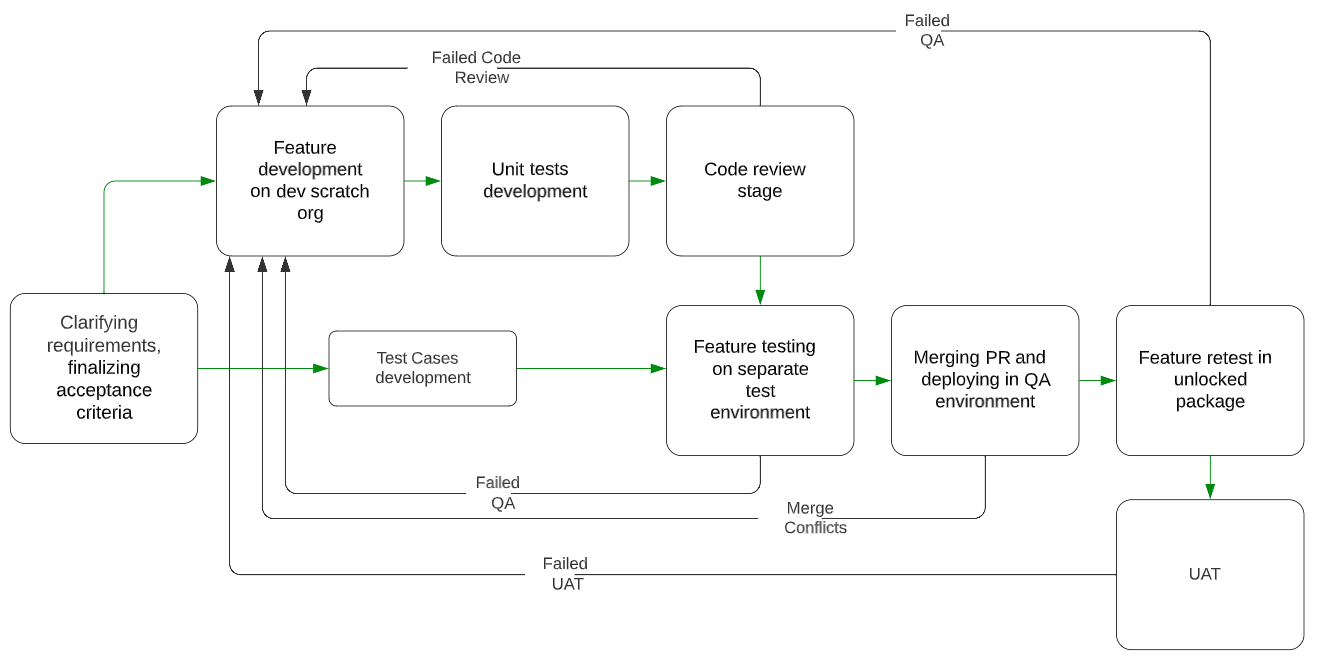
The CI/CD process was configured using the Bitbucket tool. We defined a clear workflow for all tickets which is as follows:
- Clarifying requirements and finalizing acceptance criteria;
- Feature development on dev scratch org;
- Unit tests development;
- Code review stage (pair review is used);
- Feature testing on separate test environment created from feature branch in bitbucket;
.png)
- Pull request merging and deploying in the QA environment from the release branch (assembling unlocked package);
- Feature retest in the unlocked package;
- UAT (or test results review by the product owner).
The schema looks like this:
Our releases don’t have a fixed timeline, but usually, it takes from 1 to 3 months and depends on the release goals and scope. The release testing procedure includes the following steps:
1. All release features testing should be completed in QA org with an unlocked package;
2. Code freeze announced;
3. Assembled beta package (performed Smoke test + new features testing + regression testing of affected items);
4. Hot fixes test in the updated beta package;
5. Assembled and tested the Release version.
After the last step, a new release can be delivered to clients.

For test management, we have selected the Zephyr tool integrated with Jira. It helps us:
- To build a clear structure of test documentation (test cases) grouped by epics;
- To create about 1000 test cases to cover both product's functions;
- To plan regression testing scope based on affected items;
- To build test case coverage;
- To build reports with test results;
- To monitor test results during releases to identify weak points.
Results
Processes play an important role in project planning and team organization. Structured processes help to avoid chaos in atypical situations and build a sequence of actions that will help to solve the problem.
Our team managed to build effective processes that help to successfully cope with work on 2 projects in parallel. As a result, we can note:
- dozens of launched product releases, including 2 for the current year;
- dozens of end customers and tens of thousands of active users of our products;
- transparent development and testing process at all stages and, as a result, saved client time for UAT testing;
- motivated team ready to work on new product improvements.